

Singing River Electric operators and engineers are making our outage map an even more useful tool for our members!
Here are two new features:
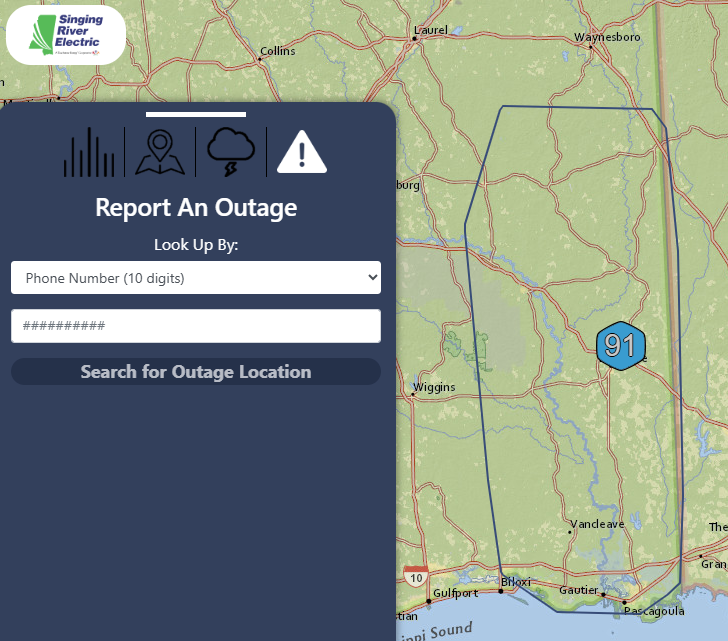
Report outages directly from the outage map
Click on the triangle in the menu and enter either your account number, meter number, or the phone number associated with your account. Then click “Search for Outage Location” and follow the prompts to submit your outage.
View the streets associated with each outage
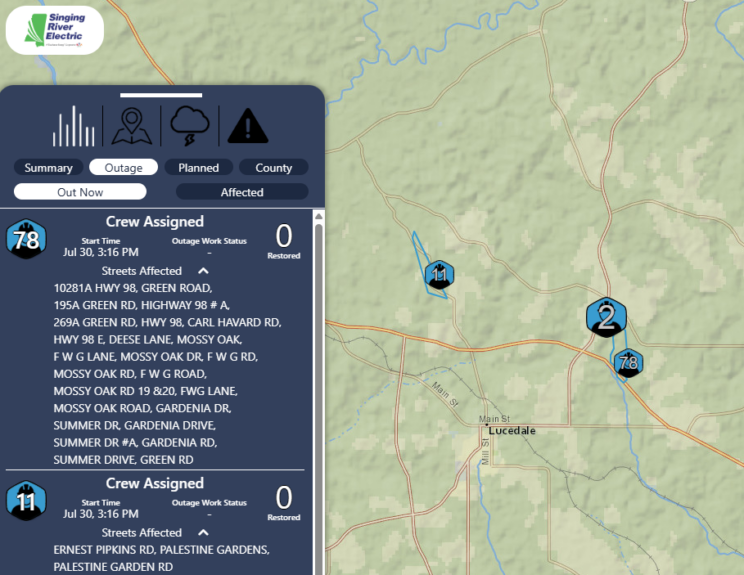
Using the “Streets Affected” dropdown, members can see if their home or business is affected by an outage. A closer zoom level enhances the view of the affected area.
Make sure your current phone number and email address are on your account so you can report outages without delay and receive updates related to your electric service.
To update your contact information:
- Send an email to contactus@singingriver.com.
- Text a member service representative at 228-591-9166.
- Change contact method in the SmartHub app.
- Call our office at 601-947-4211, 228-497-4211, or 601-989-2345.
- Complete and submit the form on the back of your bill statement.
Outage Map Icons Explained
Verified – blue hexagon: Our operators/dispatchers or linemen have verified the outage and the number of affected meters.
Predicted – yellow hexagon: Our outage management system, operators/dispatchers, and linemen are checking other points around the reported outage to determine its extent. This predicted outage will become a verified outage once the number of affected meters is confirmed.
Crew Assigned – lineman inside a hexagon: A crew is assigned to this outage and is either currently working or is on the way to restore power.
Planned – green square: Planned outages are commun icated to affected members before the outage takes place by emails, SmartHub app push notification, and/or text messages.